
Expressions and paths
Bernard does not store a file path as is: it stores an expression, a text in which some parts are replaced by values from Bernard. The same file can thus have the right path on a Windows workstation, a Linux workstation or a remote server.
This page explains the expression language, the Path Edit tool that lets you check and fix them, and path variations by operating system and by site. To create a file and manage its versions, see File management.
What an expression is
An expression is ordinary text in which some parts are written between < and >. Bernard replaces each of these parts
with a value.
File paths are expressions. Any text property that the administrator has marked Is Interpreted is one too (see Root Settings).
Example, for the file of a shot:
D:\prod\<Parent.Name>\<Name>
If the shot is called sh010 and its parent SEQ010, the resulting path is D:\prod\SEQ010\sh010.
A path is built step by step: the expression of a file can quote a file of the parent, whose expression in turn quotes a file of the grandparent, from the project folder down to the file.
The names used between < and > are not case-sensitive: <Name> and <name> are identical.
The syntax
| To get | Write | Example | Gives |
|---|---|---|---|
| a property of the object | <Property> |
<Name> |
sh010 |
| a property of a parent | <Parent.Property> |
<Parent.Name> |
SEQ010 |
| an element of a list, by its rank | <List[n]> |
<Files[0]> |
the first file of the list |
| an element of a list, by its name | <List[name]> |
<Files[env_bg]> |
the file named "env_bg" |
| a text in upper or lower case | .upper() or .lower() |
<Name.upper()> |
SH010 |
| a part of a text | <Property[start:end]> |
<Envelope[0:3]>, with the value "letter" |
let |
| the file version, with zeros | <self.version[##]> |
current version 5 | 05 |
| an image sequence | <Start Frame:End Frame[###]> |
frames 1 to 100 | one number per frame, on 3 digits |
| a calculation | +, - |
<1 + 5> |
6 |
| a repetition | <for x in List [body]> |
<for f in Files [<f.Name>;]> |
plate;env_bg; |
| an environment variable of the workstation | <env.NAME> or <ENV.NAME> |
<ENV.PROD_ROOT>\<Name> |
D:\prod\sh010 |
| a particular object | <root>, <item>, <compound>, <children>, <user>, <computer>, <datetime>, <id> |
<compound> |
the compound of the task |
A few details:
- The zeros of the version. The number of
#sets the width:[##]gives05,[####]gives0005. - Image sequences.
<Start Frame:End Frame[####]>takes the first and the last frame of the object. To display the range rather than the first file, Bernard writes[start:end (count)], for exampleSH0010.[1001:1100 (100)].exr. - Environment variables.
envmust be the first word. A file called "env_bg" (<Files[env_bg]>) is not confused with a variable. - Repetitions. The list quoted after
inmust be a list of Bernard objects, such asFiles. The body between square brackets is interpreted for each one, and the results are put end to end. Inside it,<context.Property>gives a property of the object that carries the expression:<for f in Files [<f.Name>@<context.Name>;]>givesplate@sh010;env_bg@sh010;.
A complete example
A "Model" file of a shot, whose current version is 5. Its expression, on Windows:
<Parent.Files[0]>\Model_v<self.version[##]>.obj
<Parent.Files[0]> is the first file of the parent (here, the shot's folder). Depending on the path variation and the
version, Bernard gives:
| Case | Resulting path |
|---|---|
| Local variation, current version | P:\demo\SH0010\Model_v05.obj |
| Local variation, version 2 requested | P:\demo\SH0010\Model_v02.obj |
| a network share variation | \\nas01\demo\SH0010\Model_v05.obj |
(The drive and share names are made up.)
Error messages
When an expression cannot be interpreted, Bernard displays a message between asterisks in place of the value, and Path Edit underlines the offending name in red.
| Message | Cause | What to do |
|---|---|---|
* Error: '…' not found on … * |
the property or name does not exist on the object | fix the spelling, or add the property to the object |
* Variable (…) is not set in your environment * |
the environment variable does not exist on this workstation | define it on the workstation, then restart Bernard |
* Error: Unable to interpret '…' * |
the expression is malformed | check the < and > and the square brackets |
* Recursion Error: '…' * |
a property quotes itself | remove the circular reference |
* Error: Only one value expected from list for '…' * |
a list is used without choosing an element | add [n], or [name] |
* Error: '…' not found in the list for '…' * |
the name quoted between square brackets is not in the list | fix the name |
* Error: Context Node Not Found (possibly deleted) * |
the starting object was deleted | restore the object, or fix the expression |
The expression editor
When you edit an expression (in an interpreted property, in Path Edit or in the Paths Variation tab), the editor:
- colors the syntax;
- suggests the available names:
Ctrl+Spaceshows the suggestions,Esccloses them; - underlines an unknown name in red.

Path Edit
What it is for: checking and fixing the paths of all the files of a selection. For a given variation and system, the view shows the expression of each file and the path it gives.
Where to open it: Windows › Path Edit, then select an item (or a folder, or a project).
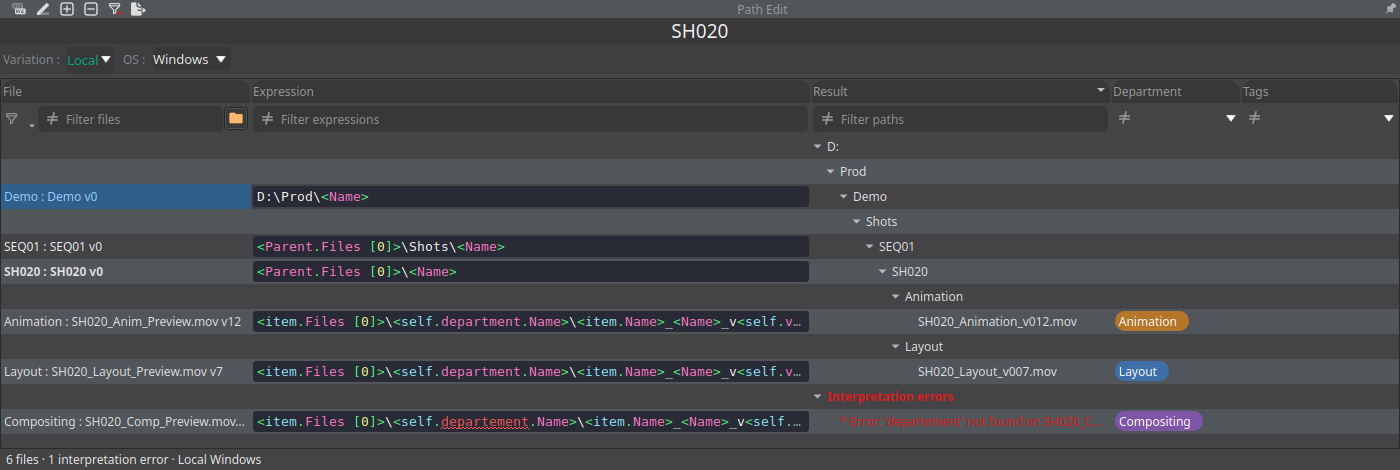
What you can do
- Choose the variation (Variation) and the system (OS) displayed.
- Filter: the Filter expressions and Filter paths fields filter by text, with the ≠ button to invert; other filters work on the parent type, the department or the tags. Clear the filters of the columns clears them.
- Display: Expand all and Collapse all; Edited expressions only (for the variation and the OS shown) keeps only the files whose expression has been modified; Show the file's parent with its name.
- Search with
Ctrl+F(Search in the expressions) and replace withCtrl+H.F3andShift+F3move to the next or previous result. Options: Match case, Whole words, Regular expression, Show the replacements (preview of the new path), Also replace in the expressions inherited, Matching files only. Replace and Replace all act on the ticked files. - Edit an expression directly in its cell, with the expression editor.
- Right-click on a file: Copy the path, Copy the expression, Use the inherited expression.
- Export the paths (Export the paths), or the expressions in JSON format (Export the expressions (json)).
An example of use: the project's disk changes letter, from D: to P:. Tick the files concerned, search for D:\prod with
Ctrl+H, replace with P:\prod, check the preview with Show the replacements, then click Replace all.
What can get in the way: changing the paths of a variation requires the Can modify file paths for specific Path Variations permission (see Roles Setting).
Path variations by system and by site
The same file does not have the same path everywhere: on a studio Windows workstation, on a Linux workstation, on a network share, at a vendor. Bernard resolves this with path variations.
How it works
- Variations are studio categories. Local exists by default. The administrator adds others: a shared storage, another site, an SFTP server (the variation then carries the Is SFTP box).
- Each file carries one expression per variation and per system: Windows, Linux, macOS.
- Each workstation has its current variation, Current Path Variation, Local by default. Its system is detected automatically.
- Bernard chooses the expression of the workstation's variation and system, interprets it and keeps the result in memory.
- Copies go from one variation to another: downloading copies to the workstation's variation, uploading copies from it (see File management).
If the expression is missing, Bernard does not stop:
- if the file has no expression for the workstation's variation, Bernard takes the first variation that has one;
- if the file has none for the workstation's system, Bernard takes the one of another system and converts the separators (backslash or slash);
- on an SFTP variation, the separators are always slashes
/.
Where to see and set them
- On a file: the Paths Variation tab of the Properties panel (see Property View) shows the file's expression for each variation and each system, and you edit it.
- On a workstation: a Computer object carries the Current Path Variation property, as well as Local Path Variation and Remote Path Variation, and the Path Variation Settings tab of its sheet sets its variations.
- On a whole selection: the Path Edit view.
An example: an office workstation and a remote workstation
The studio has two variations, Local and NAS. A file has two expressions:
| Variation | Windows | Linux |
|---|---|---|
| Local | P:\demo\<Parent.Name>\<Name> |
/mnt/demo/<Parent.Name>/<Name> |
| NAS | \\nas01\demo\<Parent.Name>\<Name> |
/nas/demo/<Parent.Name>/<Name> |
An artist on Windows, whose current variation is Local, opens P:\demo\SEQ010\sh010. When they download the file from the
remote server, Bernard copies it to that path. A Linux workstation that also uses the Local variation gets
/mnt/demo/SEQ010/sh010.
(The paths and share names are made up.)
What can get in the way: changing the paths of a variation requires the Can modify file paths for specific Path Variations permission.
Going further
- File management: creating a file, adding a version, copying, opening.
- Interface: where Path Edit sits among the views.
- The Python API documentation (Help › API Documentation menu): reading an interpreted path from a script with
GetPathValue.